
Service Operation
This stage of the service lifecycle is typically the longest and is also highly visible to the customer, making it crucial for maintaining a high level of service. The quality of Operation is paramount, but it largely depends on the success of the Strategic Assessment, Service Design, and the successful implementation of various Service Transitions.
Goals
The primary objective is to deliver a service at a level no lower than that defined in the requirements. Since Operation is the most visible stage of the lifecycle to the Customer, it deserves special attention—the customer will always be the one evaluating the quality of the service.
The processes discussed previously frequently referenced Operation processes, demonstrating the importance of other lifecycle stages for the successful implementation of Operation (the involvement of processes from other lifecycle stages is presented below). Thus, success depends on the successful functioning of the entire process suite. This also applies to the personnel supporting the service — it is essential to convey that the success of the entire service depends on every detail, on every team member.
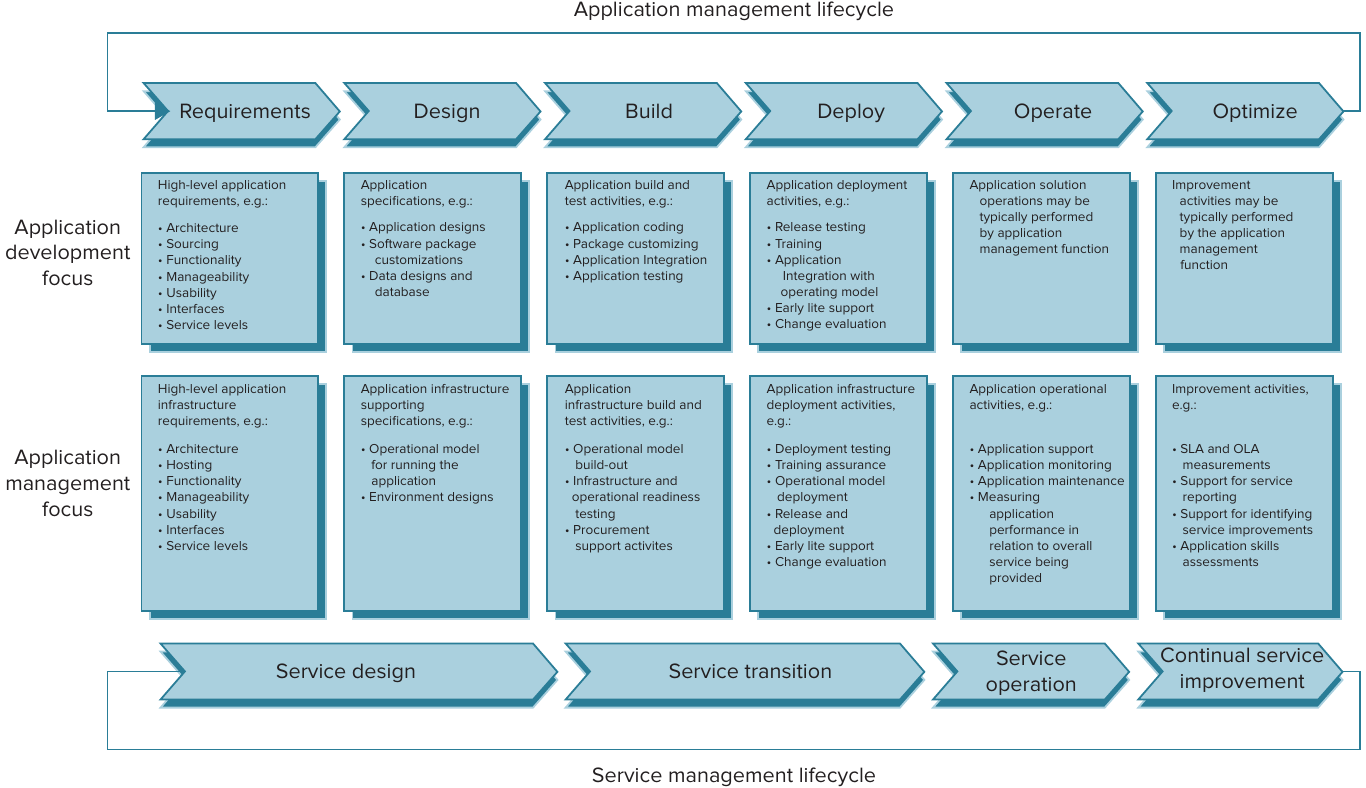
Tasks
- Providing services at a level no lower than that specified in the Service Level Agreement, SLA;
- Ensuring that the business receives exactly the service it requires;
- Resolving Incidents and Problems;
- Controlling access to the Service.
Boundaries
Operations can encompass everything required to directly deliver a service, as ITIL defines them as all “processes, functions, management, and tools.” Furthermore, all elements falling under this definition can be grouped:
- Services. More specifically, the actions performed to deliver a service in accordance with requirements. This group includes all actions performed to ensure the service is provided;
- Service management processes. Processes for managing events, incidents, problems, and access;
- Technology. This includes the management of objects such as PCs, network communications, servers, databases, the data itself, etc.);
- Staff. Those who enable service delivery through their technological knowledge, but also adhere to service management processes.
Operating providing
ITIL distinguishes four functions that participate in the Operation lifecycle. Each of these is discussed below.
Technical Management
This function focuses on organizing technical support for the service, as well as managing the personnel providing it. This function’s responsibilities include:
- IT Infrastructure Management. Ensuring that technical support staff possesses all the necessary knowledge and skills;
- Limited staff involvement in service Strategy development, more intensive involvement in Design, support during Transition, and active participation in Continuous Improvement.
Monitoring the quality and quantity of technical personnel is the direct responsibility of the service manager. While personnel requirements are only briefly outlined during the Strategy stage, they must be clearly and thoroughly detailed during the Design stage. Of course, as the need for various changes arises, it may be necessary to hire new personnel or terminate existing ones. In this case, the service manager must ensure that the technical support team is sufficient and sufficient to provide the service.
The objectives of this function are:
- Providing the necessary level of technical support to deliver the service in accordance with the Service Level Agreement, SLA;
- Participating in the planning and development of service changes;
- Resolving various Incidents and Problems in accordance with available knowledge.
Application Management
This function includes activities aimed at application management (not to be confused with Application Development, which is temporary). This function is performed throughout the entire service lifecycle, and therefore throughout the lifecycles of all applications used to provide the Service. Application Management also includes the management of external applications (i.e., those provided by External Providers), but necessary for service delivery. The function’s scope of responsibility is similar to Technical Management, but it places a greater emphasis on applications:
- Application Management;
- Application knowledge tracking;
- Ensuring the necessary personnel with the required knowledge and skills to support applications.
The objectives of this function include:
- Identifying management and functional requirements for applications;
- Assisting in application development;
- Assisting in application deployment;
- Supporting applications in Operation mode;
- Researching and reporting on potential improvements.
Operations Management
This function involves performing day-to-day operations to support the Service. The primary objective is to maintain service stability and availability at the level specified in the SLA. While this function is most addicted to change, it is also the most critical — the quality of service delivery depends on this function. This function may vary for each organization and service configuration, but regardless of the type of service, the importance of IT to the organization, or the size of the IT department, the Operations Management role can be broken down into two categories:
- IT Operations Control
- Monitoring events occurring during service provision, sometimes referred to as Console Management;
- Scheduling tasks required to maintain the service, such as creating database backups;
- Backup storage of critical data. In addition to classic database backup, this may include backups of production applications, their settings, etc.;
- Performing other tasks, including archiving various data (e.g., service user manuals), preparing and storing various documentation.
- Facilities Management
- Ensuring the required amount of energy, including provision and management of uninterruptible power supplies;
- Ensuring the necessary conditions (e.g., temperature) for equipment.
It is important to note that even if such equipment provision is transferred to a third party (i.e. External Service Providers), Facilities Management does not disappear because of this; it still needs to be provided.
The primary objective is to ensure the ability to provide the Service. This function can be confused with Technical Management and Application Management, but Operations Management is more often considered to encompass the day-to-day operations that support services — for example, quick server reboots, server recovery after a failure, returning software to a working state on customer machines, etc.
Service Desk Function
This is the function most visible to the Customer. The tool for this function is the Service Desk, whose responsibilities include providing customer service and quickly resolving any issues that arise during service use. Typically, the Service Desk is thought of as the department that handles phone calls from users, but this isn’t always the case — there are various ways this IT department can support the service.
Since this is the most visible function for the Customer, it requires special attention both during the Service Desk Design and during its day-to-day operation. The key feature of this service is that it should provide a Single Point of Contact, i.e., it is necessary to ensure that the Service Desk operates in a way that allows a single call to resolve the issue (or at least report it and have it addressed by technical specialists). The service’s functions include:
- Resolving as many Incidents as possible;
- If Incidents cannot be resolved, escalate them to other technical support groups;
- Problem reporting;
- Processing service requests;
- Providing information to users;
- Informing the business about upcoming events, resolved Problems, and Incidents;
- Monitoring Incidents against SLA targets and providing relevant reporting;
- Updating the Configuration Management System (optional);
- Collecting statistical metrics.
Since staff turnover in the Service Desk is quite high, its organization often presents challenges. It’s important to design a training process for new employees so they can provide technical support as quickly and easily as possible without compromising the quality of customer service. Knowing how to resolve an Incident isn’t always enough; it’s essential to be able to explain the solution in a user-friendly manner.
A linear approach is often chosen for organizing a Service Desk — where technical support is organized into lines, each handling requests of varying complexity and, accordingly, varying volumes of requests. This frees up highly qualified specialists and gives them more time to resolve more complex and challenging issues.
ITIL identifies the following organizational structures for Service Desk:
- Local Service Desk. This is characterized by the Service Desk being located in the same location as the business;
- Centralized Service Desk. The Service Desk is located at the same location as the business, but in only one office, where all user inquiries are handled;
- Virtual Service Desk. The Service Desk can be physically located in multiple locations, while maintaining a single point of contact. This organization is often used by large organizations to costs by employing staff from countries with a lower standard of living. For example, a large European organization with offices in several European and North American countries may have a Service Desk in India.
- Follow the Sun. This organizational structure isn’t specified in ITIL, as it’s more of a subset of the Virtual Service Desk. Its purpose is to provide 24/7 support. This is achieved by having Service Desks located in various low-cost countries. This allows for maximum coverage of business hours and affordability around the clock.
Each of them has its own pros and cons, the main ones are presented below:
| + | - |
|---|---|
| Local Service Desk | |
| Works in the same location as users, providing direct access to the source of the problem. |
High cost |
| Same language | Decentralized [Incident Knowledge Base]() |
| Same time | Difficulty opening a new facility for support |
| Same working hours | |
| Centralized Service Desk | |
| Average cost | Language differences. A standardized language (e.g., English) must be spoken by all participants. |
| Centralized [Incident Knowledge Base]() | Time difference |
| Easy to add new objects for support | If an [Incident]() cannot be resolved remotely, additional time is required to resolve the source of the problem. |
| Virtual Service Desk | |
| Low cost | Language differences. Knowledge of a standardized language (e.g., English) is required for all participants. |
| Easy to add new objects to support | Requires highly qualified management. |
| Time difference | |
Objective:
- Logging all Incidents with the required level of detail;
- Categorizing Incidents for subsequent analysis;
- Researching, diagnosing, and resolving emerging Incidents;
- If an Incident cannot be resolved, identifying a technical team capable of resolving it;
- Changing the Incident status if it is resolved;
- Participating in user satisfaction surveys.
Incident Management Process
The first thing to note is that this process is always performed by the Service Provider in one form or another, even if it does not follow the ITIL methodology.
In principle, incidents always occur, and it’s impossible to protect against them, even with the highest-quality services. In reality, service quality is determined precisely by the response to incidents and the speed of their resolution. Here, it’s important to define the term: an Incident is any unplanned event that interrupts service provision, reduces service quality, or any other negative phenomenon, even if it doesn’t affect the service’s availability, but does impact its Configuration Items.
It’s important to note that Incident Management doesn’t address the root cause of an Incident; that’s the responsibility of Problem Management. However, these two processes are closely linked: when a problem occurs, the user reports it to the Service Desk, which creates an Incident record; if the Incident can’t be resolved quickly, it’s transferred to the Problem Management process, and only after this process has had an impact on the Incident (finding a solution to resolve the Problem) can the Incident be closed.
Goals
The main goals of the process is to resolve all incidents that arise as quickly as possible.
Tasks
- Logging all incidents that occur;
- Responding to incidents as quickly as possible;
- Resolving as many incidents as possible;
- Reporting incidents that occur.
Boundaries
This process applies to all incidents that arise, regardless of the source of the incident — it could be service users, technical staff, or External Service Providers. All incidents reported to the Service Desk must be logged. However, not all calls to the Service Desk can be considered incidents—only those caused by malfunctions in the service’s Configuration Items, rather than user error or incompetence, should be considered incidents.
For successful Incident Management, it’s also important to prioritize incidents — this assessment should be based on business priorities. This will subsequently help eliminate seemingly invisible causes, such as a lack of user experience or service desk staff.
Incident Management concepts
- Time Limits. It is necessary to define time limits allocated for incident resolution by both the Service Desk and External Service Providers. This will allow us to evaluate the effectiveness of the services responsible for these tasks, as well as assess the quality of support provided by External Providers.
- Incident Models. These are prepared solutions for previously occurring Incidents. In other words, these are Incident resolution templates.
- Major Incidents. Incidents designated as such will be considered critical and the most important to resolve. To achieve this, before providing the Service, it is necessary to determine which Incidents will be considered major.
- Incident Status. Assigning Incident statuses is crucial for service maintenance — it allows you to study the history of each Incident, identify trends in implemented changes, etc. Typically, the following Incident statuses are distinguished:
- Opened. Any Incident must be assigned this status upon initial entry into the Service Desk. Once set to Open, the Incident is either processed by subsequent support lines or becomes Closed if resolved by the first line of technical support;
- Assigned. This status denotes the transfer of the Incident to another department or senior technical support line. The Incident is not assigned to any client;
- Allocated or In Progress. The Incident is assigned to a responsible person and is currently being processed for resolution.
- On Hold. This status is assigned when the Service Desk is unable to continue resolving an Incident due to reasons beyond its control, such as being unable to contact the Incident initiator or unable to test a change;
- Resolved. This status is assigned when technical specialists have completed all necessary work, but confirmation from the Customer has not been received. Depending on the organization’s policy, an Incident may be assigned the Closed status after a certain period of time if there is no response from the customer. Upon receipt of a response from the customer, two possible outcomes are possible:
- reassigning it to the Allocated (or In Progress) status;
- assigning the Incident to the Closed status.
- Closed. This status is assigned only if the Customer has confirmed the Incident’s resolution Incident.
However, it is worth noting that, depending on the unique characteristics, an organization may define its own list of Incident statuses for the Incident life cycle.
Managing Incidents
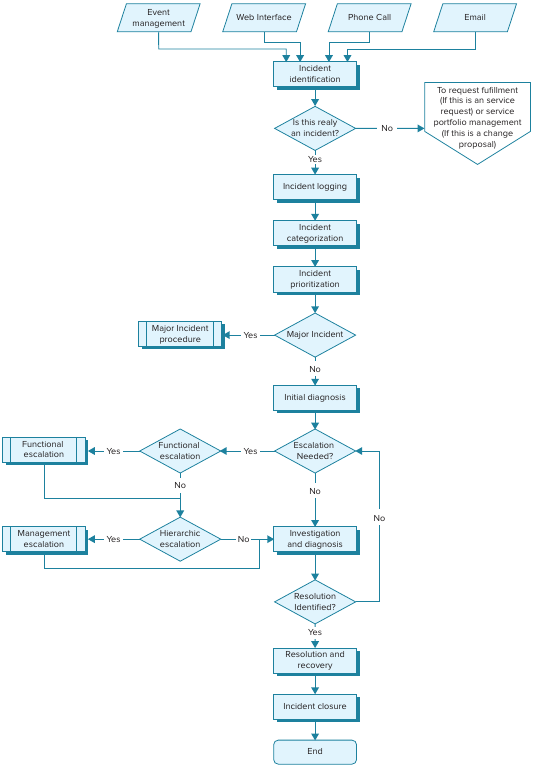
- Identification
The Incident handling process begins only at this stage. As stated earlier, the source of the Incident identification is not important; the fact that it occurred is what matters. The source may include users, technical personnel, or Event Tracking Tools (e.g., a logging system).
- Logging
An Incident Record should be created after each Incident is identified and should contain brief information about it. During the initial stages of Incident processing, the amount of information will likely be limited, but even at this stage, it should contain sufficient detail for more technically-skilled personnel to handle the Incident. Various systems exist for Service Desks, each with its own specific features and logging capabilities, but there is a minimum set of data that is essential for successful Incident handling:
- Incident Identification System – each Incident must have a unique identifier by which it can be found;
- Incident Categorization System;
- Ability to indicate the importance, potential damage, and urgency of Incident resolution;
- Date and time of each Incident transition to a new state, as well as a system for identifying who made a particular change;
- Methods for notifying all Stakeholders about the Incident status (e.g., via fax, email, phone notification, etc.);
- Contact information for the person who identified the Incident;
- Definition of Incident status (discussed above);
- Link to a Configuration Item, a currently resolved Problem, or a known error;
- Linking an Incident to a responsible person or group of persons.
The better and more complete the recording of an Incident (primary, even more so), the more beneficial it will be for subsequent.
- Categorization
Initially defining an Incident Category improves the ability to identify the person responsible for resolving similar Incidents. It’s worth noting that using “other” or “miscellaneous” categorizations is not recommended, as it can waste a significant amount of time later on in determining the proper category for an Incident with that category.
Of course, a Hierarchical definition of Incident Category is also allowed, for example:
- Software
- Reporting System
- Daily Turnover Report
- Reporting System
- Prioritization
At this step, the Incidents that should be addressed first are selected, while those that can be postponed are selected. It’s important to remember that the business should determine the superficial prioritization of Incidents — meaning, the business should prioritize the types of Incidents that pose the greatest risk to it. While the IT department often assists with this prioritization, the final decision always rests with the business. For example, the business may indicate that the operability of individual service components is less important than the reporting system—this clearly indicates which service area is most important to the business, and therefore, the priorities for the Incidents associated with it.
The prioritization system itself should be designed to be simple enough for Service Desk staff to quickly identify them and send them to the appropriate responsible persons.
A scoring system, such as the one below, is often used to determine priority. It consists of an Urgency and Impact Matrix:
| Impact | Urgency | |||
| High | Medium | Low | ||
| High | 5 | 4 | 3 | |
| Medium | 4 | 3 | 2 | |
| Low | 3 | 2 | 1 | |
And Resolution Table:
| Priority code | Description | Resolution limit |
|---|---|---|
| 5 | Critical | 2 hours |
| 4 | High | 8 hours |
| 3 | Medium | 24 hours |
| 2 | Low | 48 hours |
| 1 | Scheduled | According to plans |
- Initial Diagnosis
In this step, you should perform a diagnosis of the Incident based on the data obtained as a result of completing the previous steps.
The first important operation of this step is incident matching – this involves searching for Incidents that are similar in description and characteristics and either selecting the solution that was applied previously (if the Incident was successfully resolved) or “linking” an already opened Incident with a new one (this will avoid repeating the work of resolving Incident in the future).
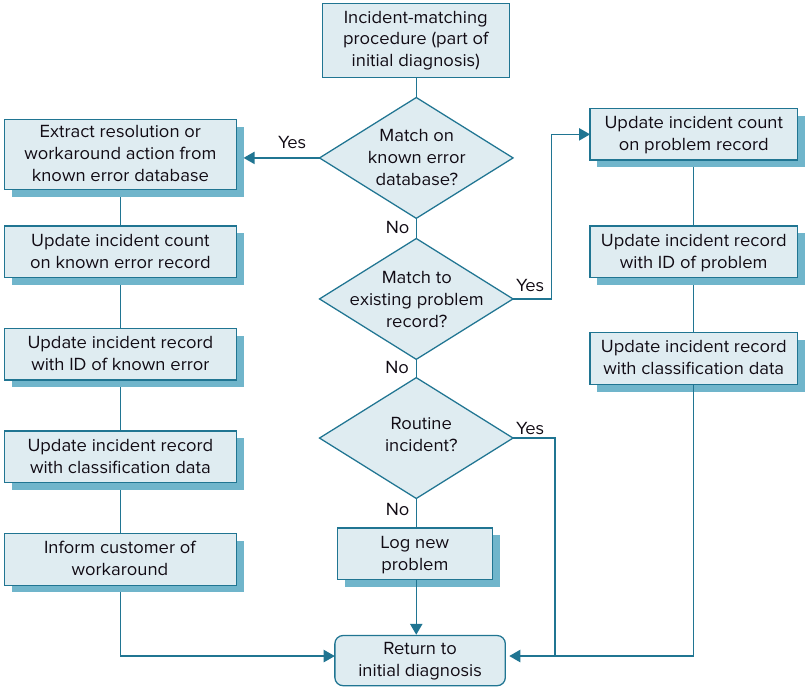
If similar Incidents cannot be identified, a second step — data collection — should be performed. It is assumed that a certain amount of information has already been collected in the previous steps; the purpose of this operation is to gather as much information as possible, including technical information. The goal is very simple: to relieve the second line of support of the need to perform this operation, thereby saving time on Incident resolution.
- Escalation
Incident Escalation involves transferring an Incident to a higher technical or management level for resolution. Often, this step only addresses the technical aspect, but when providing a service, incidents frequently arise that require specific management authority.
While this step is generally simple to implement, its most challenging aspect is often determining the appropriate level to escalate an Incident. Specifically, should the incident be escalated to a second-line support technician or to the Service Owner? For this purpose, ITIL divides Incident escalation into two types:
- Functional Escalation. This type involves transferring an Incident to a recipient capable of resolving the technical issue. For the recipient, areas of responsibility should be delineated in the Operational Level Agreement;
- Hierarchical Escalation. This type of escalation is typically used in cases of important and significant incidents. These incidents are typically managerial or strategic in nature – for example, adding a technical specialist, increasing production capacity, resolving conflicts with external service providers, etc. This type of escalation is sometimes used in cases of prolonged delays in incident resolution.
- Investigation and Diagnosis
This is perhaps the most important step in handling an Incident. The exact nature of this step depends entirely on the nature of the Incident and the service. It’s worth noting that upon completion of this step, the Incident Record should describe the solution found, or provide a link to a similar Incident that already has this description (it’s best to maintain the uniqueness of each Incident solution description).
- Resolution and Recovery
Once a solution has been found and successfully tested, it should be applied to the live service. If the identified solution fails to resolve the Incident, the Incident must be re-initiated and the process must return to Step 5, Initial Diagnosis.
- Closure
This step should only be taken once a solution has been found and the Incident has been resolved. The person who initiated the incident must be notified of its resolution, and only after the initiator’s consent can the incident be closed. Closure is accomplished by assigning the Incident the Closed status.
Incident Management Process and other processes
| Process | How it interacts |
|---|---|
| Service Level Management | the connection is very direct - Incident affects the execution of SLA, and it already has a direct impact on the fulfillment of requirements by Service Provider |
| Information Security Management, Capacity Management, and Availability Management |
this process provides security policy-related Incident data required by capacity (of all types). Tracking Incidents significantly improves the availability of the Service |
| Service Asset and Configuration Management, SACM |
allows you to evaluate the impact of an Incident on both individual Configuration Items, CI, as well as the overall Service configuration. It is important to compare Incidents with CI — this significantly improves the quality of the Configuration Management System, CMS, and ultimately, the Service |
| Change Management | Incidents are often the cause of a Change Request. The change history can help identify the cause of an Incident |
| Problem Management | frequent occurrence of identical Incidents signals the presence of Problem. In turn, resolving Problem helps to reduce Incidents and improve the quality of Service |
| Access Management | some components may be sensitive to access and external attempts to bypass security restrictions - this defines a separate subtype of Incidents that may require additional attention |
Problem Management Process
According to ITIL, a Problem is any identifiable cause of an Incident that occurs one or more times. The Problem Management Process is a process for identifying the causes of an Incident.
The difference between Incident and Problem is obvious: an Incident is the actual event that impacts something other than Service; a Problem is a single impact or a significant sequence of Incidents whose cause (Problem) has been identified. These two terms are inextricably linked, but they must be distinguished!
Goals
Documentation, identification, and elimination of causes of Incidents. It is important to note that this process is aimed at the root cause, not a temporary solution.
Tasks
- Preventing the causes of the Incident;
- Preventing future recurrence of the Incident;
- Minimizing the damage that may result from the Incident (e.g., if the cause cannot be eliminated).
Problem vs Incident
This process receives one or more Incidents as input. The output is a Problem solution, or lack thereof. In any case, the result must be documented so that the accumulated knowledge can reduce the likelihood of similar Incidents and Problems, respectively.
It is important to establish logical links between Incidents and Problems. If a Problem solution entails a change, it should also be linked—this way, a direct connection can be established with the change and its cause. ITIL specifies that even if the Incident did not originate with the Customer, they should be notified of the entire chain and the change, if necessary. The Service Provider should be open to recognizing the Problem and communicating all necessary information to the Customer — this increases trust and loyalty to change.
Unlike Incident Management, which is a reactive process, Problem Management can also be proactive. To prevent potential Incidents (which haven’t yet occurred), it’s necessary to anticipate the future behavior of the entire Service. This requires tracking Incident trends and Capacity Management metrics. Problem Management is similarly linked to Continual Service Improvement — identified Problems should be recorded in the CSI Registry.
Another distinctive feature of Problem Management is that it requires the involvement of more qualified personnel to identify the causes of Problems.
Managing Problems
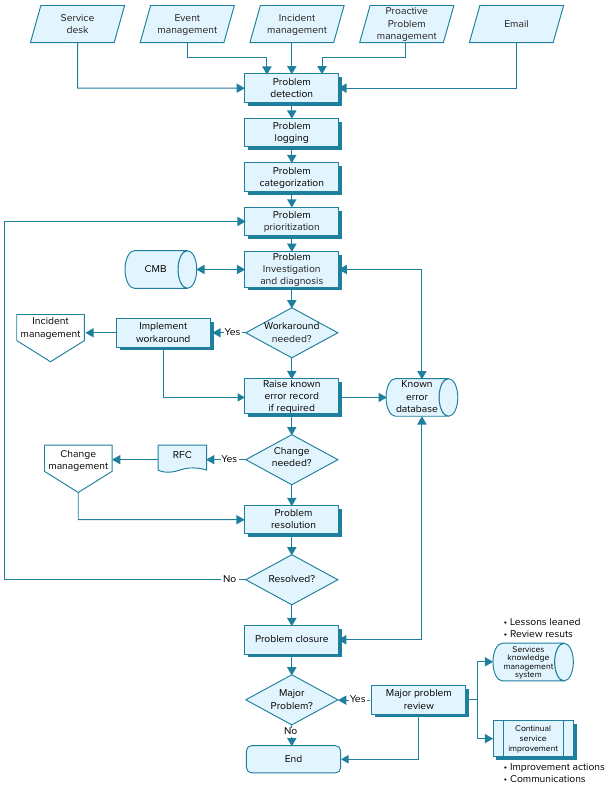
- Identification
Like an Incident, a Problem can be identified from various sources, including a reaction to an Incident. It can also be a proactive response to an external threat to a Service that has not yet generated an Incident. Furthermore, a reaction to technical or business metrics, changes in business requirements, and so on can all trigger a Problem. Systematizing “all” sources, we can identify the following:
- One or more Incidents can be consolidated into a single Problem based on the team’s experience or by identifying similar symptoms;
- Identification of problems in infrastructure or application components by the Service maintenance team;
- Requests from the Customer or third-party Service Provider;
- Analysis of Incidents and identification of subtle Problems that are not directly related to Incidents;
- Analysis of historical Incidents log entries to identify trends leading to existing hidden or potential Problems;
- Identification of Problems that limit opportunities to improve the Service quality.
- Logging
Any Problem must be added to the registry with all the necessary information. Links to Incident are critical (if one exists), but it’s important to remember that Incident is not a Problem and cannot be replaced by one.
The format of the entry may vary for each specific Service, but the generally accepted required components for a Problem log entry are:
- Date and time of entry;
- Description of the Service and component specification;
- Description of the source that identified the Problem (e.g., Customer, technical support representative, or metrics analysis);
- Priority and category;
- Active environment at the time of occurrence;
- Description;
- Cross-reference to the Problem;
- External references (in particular, to Incident, Change Record, etc.);
- Workaround;
- List of actions taken to resolve the Problem.
- Categorization
The categorization principle is similar to Incident. Categorization, in addition to simplifying detection and assigning a fix to the target team, helps identify degradation of a Service or individual component. As with Incident, categories should be standardized.
- Prioritizing
Just as for Incidents, Problems should be prioritized based on the threat they pose to the Service. Everything described for Incidents also applies to Problems, but Problem prioritization should consider not only the impact on the quality of the Service, but also the impact on the Customer and third-party Service Providers.
- Investigating
Using the previously defined priority, you should identify the causes of the Problem for subsequent resolution. The Configuration Management System, CMS can help identify not only the causes of the Problem, but also points of failure and secondary potential threat points (roughly speaking, Configuration Items, CI associated with the problematic component. Another source for identifying causes can be the Known Error Database, KEDB, which may contain relevant historical records. Recreating the Problem in the testing environment (provided there is a sufficient copy) can facilitate finding the cause.
- Identifying a Workaround
- The primary goal of the process is not a temporary solution to a Problem, but rather to identify the root cause and propose a solution. However, some Problems require an urgent and immediate solution – a Workaround. In this case, the Problem should receive a corresponding entry in the log, but should not be closed as resolved. A Workaround can be permanently resolved.
- Known Error Record
If the solution is temporary (Workaround), it should be added to the Known Error Database, KEDB. If similar Incidents occur in the future, this solution should be used without involving qualified specialists to identify and resolve the root cause of the Problem.
- Resolution
Once the root cause of a Problem has been identified and a sequence of actions to resolve it has been determined, a Request for Change, RFC should be created and assigned to the Problem (which in turn is assigned to the Incident). Until the RFC is fulfilled, technical services should use the Workaround (if available), but it will eventually be replaced with a permanent solution, and the corresponding entry in the Known Error Database, KEDB will be updated.
If a permanent solution to the Problem is prohibitively expensive, the current Workaround may be retained as a permanent replacement. Alternatively, the search for an alternative permanent solution may continue.
- Closure
Once a Problem has been resolved, regardless of the decision taken, the entry in the problem registry must be closed with the appropriate status and a description of the decision taken for the Problem.
- Major Review
As lessons learned, a description of the sequence of actions should be provided and a superficial analysis of the decisions made and actions taken should be conducted. The recording may include successful and unsuccessful actions, an analysis of potential problems, and predicted solutions for similar Problems.
Problem Management Process and other processes
Problem Management Process interacts with:
| Process | How it interacts |
|---|---|
| Financial Management | used to justify the need for a particular solution to a Problem. Estimating the cost of losses from the Problem and the cost of its solution can be used in prioritization |
| Availability Management | has a direct impact on Service availability. Proactive actions aimed at preventing potential Problems also contribute to improved availability |
| Capacity Management | some Problems may be caused by insufficient resources, which will require a Service configuration change |
| IT Service Continuity Management, ITSCM | ITSCM can be used to temporarily mitigate the consequences of Problems (in particular, for the application of Workaround). ITSCM also helps identify the risks of potential Problems that have not yet manifested themselves |
| Service Level Management, SLM | Problems have a direct impact on SLA. SLM also participates in the prioritization of Problems; however, the SLA requirements defined in SLM should not limit the timeframe for resolving Problems |
| Change Management | a positive outcome of the Problem Management Process is the creation of a Request for Change, RFC, which can be either a permanent solution to the Problem or a temporary Workaround |
| Service Asset and Configuration Management | provides information on Configuration Items, CI where a Problem is observed. It also helps identify related CI that could potentially create additional Problems |
| Release and Deployment Management | new changes that are implemented must undergo the full change process. They must also be entered into the Known Error Database, KEDB as part of the new update |
| Knowledge Management | transfers accumulated knowledge on how to troubleshoot Problems to the Known Error Database, KEDB |
| The Seven-Step Improvement Process | both processes are aimed at improving the quality of the Service. The interaction is not limited to adding a corresponding entry to the CSI Registry, but also interact to identify potential Problems in the future |